Camera Test
Test your webcam online with our Camera Test- make sure your webcam works properly
Your browser supports webcam access and this page is running in a secure context.
All camera testing and processing happens locally in your browser only using modern web technologies. Your camera stream never leaves your device and is never sent to our servers.
How to Test Your Webcam Online
Test camera is simple:
- Open the Camera Test tool.
- Click the Start Camera Test.
- When your browser asks for permission, select Allow.
- Your webcam’s live video should appear on the screen.
- Check the video quality, brightness, colors, and camera angle.
- If you have multiple cameras, select the webcam you want to test.
Features
Our online camera test includes useful tools for checking your webcam’s video quality, image, and camera settings directly from your browser.
1. Live Webcam Preview
View your camera’s live video in real time and quickly confirm that your webcam is working correctly.
2. Take a Webcam Snapshot
Capture a photo from your webcam with the snapshot feature. This is useful for checking the actual image produced by your camera.
3. Flip Camera Image
Flip your webcam image horizontally or vertically to check how your camera looks in different orientations. The horizontal flip option is especially useful for a mirror-style webcam view.
4. Check Camera Resolution
See the current webcam resolution being used by your browser, such as 640×480, 1280×720 (HD), or 1920×1080 (Full HD), depending on your camera.
5. Check Aspect Ratio
View the webcam’s aspect ratio, such as 4:3 or 16:9, and see how your camera’s video is being displayed.
6. Camera Detection
Check whether your browser can detect the webcam and identify the available camera devices.
7. Full-Screen Camera Preview
Use a larger camera preview to get a better view of the webcam image .
8. Works Directly in Your Browser
Perform a webcam test online using a modern browser. No separate desktop application is required.
9. Test Built-In or External Webcams
You can test different types of cameras, including:
- Laptop camera test
- Desktop/computer webcams
- USB webcam
- External HD webcam
- Multiple connected camera
10. Download Snapshot
After taking a webcam snapshot, save the captured image to your device and you can download
Check If Your Camera Is Working
Online Camera test can help you determine whether your camera is functioning correctly. Look for a clear live video preview and check whether the image freezes, appears black, or shows unusual colors.
You can also check whether your camera is detected by your browser and whether the correct webcam is selected.
Why Test Your Webcam?
There are several reasons to test a webcam before using it:
- Check your camera before a video call
- Test a new USB webcam
- Prepare for an online interview
- Check your camera before an online class
- Troubleshoot webcam problems
- Verify camera and browser permissions
- Test your laptop’s built-in camera
- Check image quality and lighting
Webcam Test Before Zoom, Google Meet, or Teams
It’s a good idea to perform a webcam test before a video meeting. If the camera doesn’t work in the online test, the problem may be related to browser permissions, device settings, drivers, or another application using the camera.
Close applications that may already be using your webcam and then try the test again.
What If My Webcam Is Not Working?
If your camera doesn’t appear during the test, try these troubleshooting steps:
1. Check Camera Permission
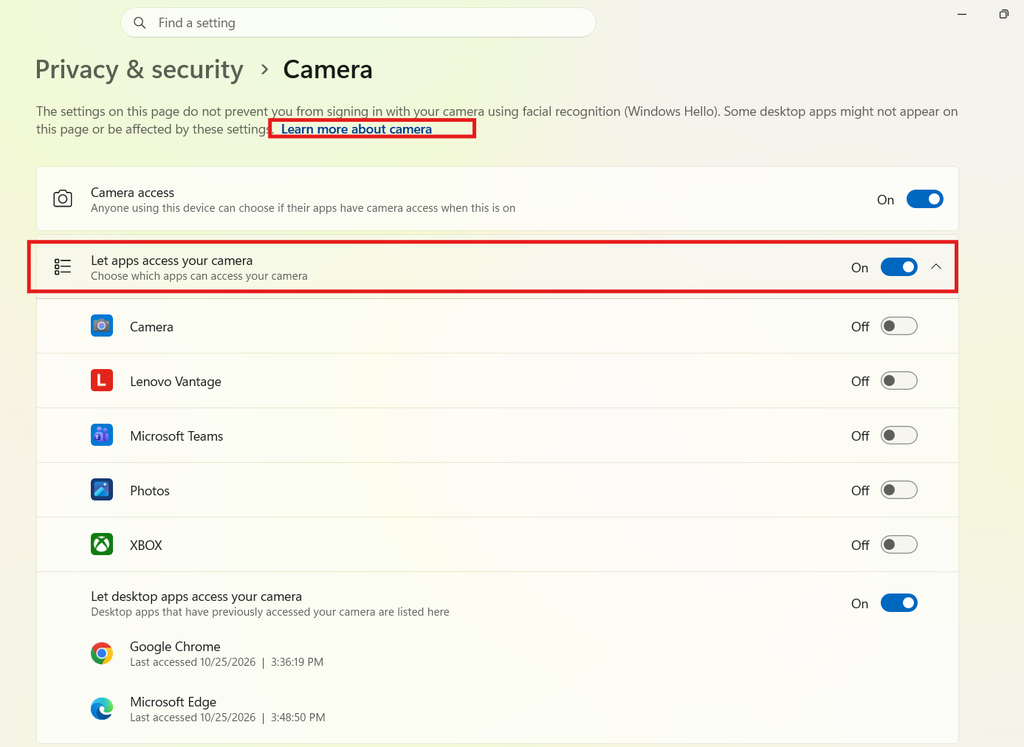
Your browser needs permission to access your webcam. If you previously blocked camera access, open your browser’s site permissions and allow camera access.
2. Select the Correct Camera
If your computer has multiple cameras, make sure the correct device is selected.
3. Close Other Camera Apps
Applications such as video conferencing software may already be using the webcam. Close them and refresh the camera test.
4. Check the USB Connection
For an external webcam, make sure the USB cable is securely connected. Try another USB port if necessary.
5. Restart Your Browser
Close and reopen your browser, then run the webcam test again.
6. Restart Your Computer
A simple restart can sometimes resolve temporary camera or driver problems.
Frequently Asked Questions
Open an online camera testing tool, allow camera permission, and check the live video preview. If you can see yourself clearly, your webcam is generally working.
Yes. A browser-based camera test can be performed without purchasing software or installing a dedicated webcam testing application.
Usually, no. Modern browsers can access compatible webcams directly through the browser after you grant permission.
A black screen can be caused by blocked camera permissions, another application using the webcam, an incorrect camera selection, a connection problem, or a device/driver issue.
Yes. You can test a built-in laptop camera using an online webcam test as long as your browser has permission to access it.